The Menu Window
What a plot shows can be picked from two places. One is the command REPL in the terminal, the other a menu window with dropdown menus, sliders, and buttons. The two are always in sync. Selecting a variable at the prompt updates the menu, and vice versa. Use whichever fits your workflow.
The menu only selects. Keyword arguments and save options are typed at the prompt, where completion and history help.
The menu window is hidden by default. Open it with the menu command, close it with hidemenu, or start the application with the --menu flag to show it right away. The related commands show and hide control the figure window instead.
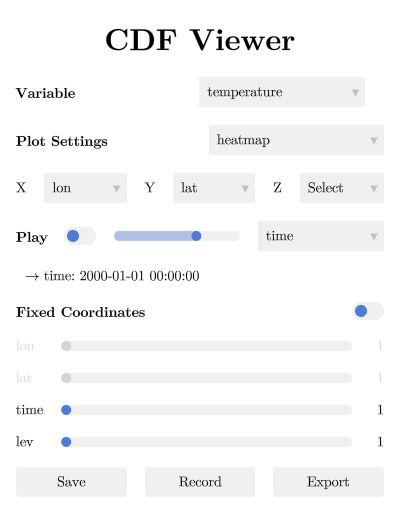
From top to bottom, the menu offers these controls.
- Variable selects the data variable to plot, with one entry per variable in the dataset (the
vcommand). A second dropdown appears beside it while a vector plot type is selected, for the partner component (see Plot Types). - Plot Settings selects the plot type (
p). The list is filtered to the types that match the number of selected axes. Keyword arguments go at the prompt (see Customizing Plots). - X / Y / Z assign dataset dimensions to the plot axes (
x,y,z). - Play animates a dimension. The toggle starts and stops playback, the slider controls the speed, and the dropdown selects the dimension to animate. The value label below shows the current coordinate value of the animated dimension. See Animation and Playback.
- Fixed Coordinates holds one slider per dimension that is not on a plot axis (the
isel/selcommands). The toggle on the right controls whether the plot updates live while dragging a slider. Turn it off for large datasets where every update is expensive. - Save / Record / Export write the current figure to an image, record an animation to a video, or print a command line that reproduces the session. The buttons use the output options set last, such as
filename="output.png"(see Saving and Recording).
In the figure window, press Ctrl-I to toggle the interpolation of unstructured variables (see Unstructured Grids).